

It’s 97°F on a Tuesday in August. A homeowner’s AC just quit. She grabs her phone, searches “AC repair near me,” and starts scrolling. She’ll click the first result that looks trustworthy, has a phone number she can tap, and doesn’t make her wait four seconds to load.
She doesn’t care about your logo. She doesn’t care about your “passion for comfort solutions.” She wants someone who can come out today, and she’s going to pick whoever makes that the easiest.
Three towns over, a different homeowner is researching a whole-home replacement. His 18-year-old furnace is still limping along, so there’s no rush — but he’s comparing companies, reading reviews, and looking for whoever seems most credible. He’ll fill out a quote form when he’s ready.
Both people are searching for HVAC contractors right now. Your website has to convert both of them, through completely different paths, at the same time.
That’s the core challenge of HVAC website design — and it’s why a visually polished site that ignores conversion architecture will cost you more in lost jobs than it ever saves in design fees.
This guide covers everything: which pages you actually need, what each tier truly costs, how to choose the right platform for your business size, why design and local SEO are inseparable, and the specific mistakes that are quietly bleeding leads from sites that look perfectly fine on the surface.
What is HVAC website design?
HVAC website design is the process of planning, building, and optimizing a website specifically for heating, cooling, and air quality contractors. Unlike a generic business website, an HVAC site must serve two fundamentally different visitors at once — the homeowner in an emergency who needs a phone number in seconds, and the one researching a system replacement over several days. That dual requirement shapes every design decision, from page structure and load speed to how financing options are presented and where reviews appear.
What makes HVAC website design different from other industries
The two conversion funnels your site must run simultaneously
An HVAC website must run two conversion funnels at the same time: one for emergency callers who need a phone number within seconds, and one for planners who research a system replacement over days or weeks. Most industries can build around a single call to action. HVAC can’t.
The emergency caller’s heat is out in January, or their AC quit during a heat wave, or the system started making a new sound at 2 a.m. They’re on their phone, they’re stressed, and they need a number to tap right now. If your phone number isn’t in the first visible inch of their mobile screen, they’re already on the next result.
The planner’s system is aging, energy bills are climbing, and they’ve been meaning to get a quote for a new unit. They want to read about your process, check reviews, understand financing options, maybe compare you against two other companies. They’ll use a lead form. They’re fine waiting until Monday.
A site built only for emergency callers won’t convert planners — there’s no content depth, no trust-building information. A site built only for planners is terrible for emergency callers — the phone number is buried, the forms are long, and nothing above the fold communicates urgency. Both groups leave without converting.
The best HVAC websites run both funnels at once. That means a sticky click-to-call bar visible within the first second of page load, and a quote form with scheduling capability further down. An emergency badge near the top, a financing explainer near the bottom. The structure has to serve both visitors without making either feel like an afterthought.
Why HVAC is a trust-first industry online

HVAC contractors face a higher trust bar than most local businesses because customers are inviting a stranger into their home to work on an expensive mechanical system. A website that fails to establish that trust quickly — with real credentials, real photos, and visible proof of work — loses leads before the phone ever rings.
Google recognizes this. Its E-E-A-T framework — experience, expertise, authoritativeness, and Trustworthiness — applies with particular force to home services industries, where a bad actor can cause real harm. A website that signals strong E-E-A-T doesn’t just convert better with users; it ranks better too.
In practice, this means your NATE certification lives prominently on your homepage and About page — not buried in the footer. Your state contractor license number is visible. Real photos of your actual team and trucks appear throughout the site rather than the same stock photo that forty other HVAC companies are already using. Your Google reviews are embedded on your site rather than hidden behind a link someone has to hunt for.
Google evaluates these signals as evidence that a real, qualified business is behind the website. So does every visitor who lands on it.
One concrete example: contractors who display their license number on their site get asked about it less on calls. The question gets answered before the call happens. That’s what trust infrastructure actually does — it removes friction at every stage of the decision.
Seasonal demand spikes and why your site must be ready before the rush
HVAC demand doesn’t flow steadily through the year. It spikes hard when weather turns. A July heat wave in a Sun Belt city can double search volume for “AC repair near me” in a single week. The contractors who capture that surge aren’t the ones scrambling to update their website in mid-July. They’re the ones who built seasonal landing pages in May, refreshed their Google Business Profile in April, and made sure their site loaded in under two seconds in March.
A site that takes four seconds to load on a Tuesday in October is costing you calls on a Tuesday in July. That’s the less obvious maths – poor performance doesn’t announce itself, it just quietly loses you leads during your most valuable traffic window.
Build and optimise your web presence during the slow season. The leads are won before the season starts, not during it.
Must-have pages every HVAC website needs
Every HVAC website needs these pages at minimum:
- Homepage — click-to-call, service area statement, trust signals, single CTA above the fold
- Individual service pages — one page per service (AC repair, furnace installation, heat pump, duct cleaning, etc.)
- City/service area pages — one page per town you serve, with unique local content
- Financing page — monthly payment options, lender details, application process
- Reviews page — embedded Google reviews with Review schema markup
- About page — real team photos, NATE certifications, license number, company story
- Blog/resources — informational posts targeting research-phase queries
- Contact page — lead form, phone number, business hours, service area map
Here’s what each one needs to do and why it matters.
Homepage: your 24/7 sales rep
Your homepage has one job: convince someone in the first few seconds that you’re the right company to call, then make calling easy.
Above the fold — the portion visible before scrolling — needs five things: a phone number that’s large and tappable on mobile, a clear service area statement (“Serving Dallas and surrounding suburbs”), a headline that speaks to the visitor’s problem rather than celebrating your company, a trust signal (star rating, years in business, a certification badge), and a single direct CTA. Not five. One.
What it doesn’t need: a 90-second autoplay video, a paragraph about your “commitment to excellence,” or a navigation menu with twelve items. Every element that isn’t helping a visitor take the next step is friction — and friction costs calls.
Keep navigation simple: Home → Services (with dropdown) → Service Areas → About → Reviews → Financing → Blog → Contact. Any critical page should be reachable in two clicks.
Individual service pages: why one “Services” page is costing you rankings
This is the single most common structural mistake on HVAC websites, and it quietly devastates local search performance.
Google ranks individual pages, not websites. When someone searches “AC repair Scottsdale,” Google is looking for the page on your site that most specifically answers that query. If all your services — AC repair, furnace installation, duct cleaning, heat pump service, indoor air quality — share a single /services page, none of them rank as well as they should, because that page is simultaneously targeting every keyword and dominating none of them.
Each major service needs its own URL, its own keyword target, its own content, and its own conversion path. At minimum:
/ac-repair— targeting “[city] AC repair,” “air conditioner repair near me”/furnace-installation— targeting “furnace installation [city],” “new furnace cost”/heat-pump-service— targeting “heat pump repair [city]”/duct-cleaning— targeting “duct cleaning [city]”/indoor-air-quality— targeting “air quality testing [city]”/hvac-maintenance— targeting “HVAC tune-up [city],” “AC maintenance plan”
Each page should open with the specific problem it solves, include trust signals relevant to that service (how many similar jobs you’ve completed, which brands you work with), carry a clear CTA, and link to related pages. This isn’t just good SEO — it’s a better experience for someone who only cares about a furnace replacement and doesn’t want to read through your AC repair content to find what’s relevant.
City and service area pages: how to rank in every town you serve
If you serve twelve towns, you need twelve pages. Not one “Service Areas” page with a bulleted list of cities. Twelve individual pages.
Here’s why. When someone in Plano, Texas searches “HVAC repair near me,” Google’s local algorithm heavily weights pages that specifically mention Plano — in the URL, in the H1, in the body copy, in the page title. A /service-areas page listing “we serve Dallas, Plano, Richardson, Garland…” contributes almost nothing to your ranking in any of those cities. A page at /hvac-repair-plano-tx with substantive, locally specific content is an entirely different signal.
The key word is substantive. Thin city pages — where you swap the city name but leave all the copy identical — are a duplicate content problem. Google recognizes them and discounts them. Each city page needs to be genuinely different: mention local landmarks, reference the neighborhoods you work in, include a review from a customer in that city if you have one, and customize the service area map.
For a contractor serving eight to twelve cities, that means eight to twelve pages of real content. It’s work. It’s also the single highest-ROI investment in your entire website. Ask any HVAC contractor who went from one generic “service area” page to twelve individual city pages — the ranking improvements are usually visible within 60–90 days.
Financing page: the conversion element most HVAC sites skip
A full system replacement runs $8,000–$20,000. For most households, that’s not a check they write without thinking overnight — and for plenty of homeowners, it’s genuinely unaffordable as a lump sum.
Contractors who make financing prominent typically see a 15–20% increase in average ticket size, because financing eliminates the biggest objection between a homeowner and a decision. But the option only works if people know about it before they start comparing you to competitors.
A buried footer mention of “financing available” doesn’t count. You need a dedicated /financing page that explains how it works, what a typical monthly payment looks like, which lenders you work with (Synchrony, GreenSky, and EnerBank are common), how the application process works, and whether promotional periods are available.
The homeowner who was going to say “I need to think about it” is much more likely to book when they’ve already seen a $149/month payment option before they even call you.
Reviews and social proof: turning Google reviews into a ranking asset
Reviews aren’t just a trust signal for visitors — they’re an active local ranking factor. Google’s algorithm weighs both quantity and recency. A steady flow of five to ten fresh reviews per month consistently outperforms a company with 200 reviews from three years ago and nothing recent. Google uses review velocity as a signal that the business is actively serving customers.
On your website, reviews should appear in multiple places: a carousel on the homepage, a dedicated /reviews page that embeds your Google reviews, and relevant testimonials on individual service pages. Implement Review schema markup on your review page so Google can display your star rating directly in organic search results.
One practical note: when asking customers to leave reviews, make it frictionless. A direct link to your Google Business Profile review form — shortened with a QR code for printed materials — removes every barrier. Most satisfied customers are willing to leave a review. They just don’t, because no one made it easy.
About page: credentials, real photos, and the trust signals that close jobs
Your About page works harder than you think. It’s often the second or third page a prospective customer visits, because they want to know who they’re actually letting into their house.
What belongs there: real photos of your technicians (not stock images), your NATE certifications and manufacturer-specific credentials (Lennox Premier Dealer, Carrier Factory Authorized, etc.), your state contractor license number, how long you’ve been operating, and something genuine about what you’ve built and why it matters to you.
What doesn’t belong: three paragraphs of “We are a family-owned business committed to providing the highest quality service to our valued customers.” Nobody reads that. It appears on thousands of HVAC websites and communicates exactly nothing about your company specifically. It’s filler that actively wastes one of the highest-trust pages on your site.
Your About page is a significant E-E-A-T signal. Google evaluates it as evidence that a real, qualified business operates behind the website. Treat it accordingly.
Blog and resources: the long-term SEO engine
A blog doesn’t need to be a major production. Four to six posts per year, each targeting a specific question your potential customers are already searching for, will outperform zero posts every time.
Good HVAC blog topics include:
- “How long does an HVAC system last? (And signs yours is getting close)”
- “AC maintenance checklist for homeowners before summer”
- “What size air conditioner do I need for my home?”
- “Heat pump vs. gas furnace: which is right for [your region]?”
- “Why is my energy bill so high in summer?”
These posts capture homeowners in the research phase — before they’ve decided to call anyone. A homeowner who finds your “how long does an HVAC system last” post helpful is meaningfully more likely to call you when their system eventually fails than someone who found you through a cold search.
The blog also compounds over time. A post you write in February still pulls traffic three years later. It’s the one part of your marketing that doesn’t stop working when you stop paying for it.
HVAC website design elements that directly drive leads
Mobile-first design: where your customers actually are
The majority of HVAC searches happen on a smartphone — and that share peaks exactly when urgency is highest. Nobody sits down at their desktop to research AC repair when their house is 85 degrees. They grab their phone.
Mobile-first design isn’t just about making the desktop site shrink gracefully. It means designing for the phone experience first and treating desktop as secondary. That changes real decisions: tap targets need to be at least 44×44 pixels to hit reliably with a thumb; the phone number needs to be reachable with the thumb on a large phone (top-center or bottom bar, not top-right); forms should ask four fields maximum for an emergency contact; visual hierarchy puts the most important content first with everything else below.
Google measures your mobile performance through Core Web Vitals — three specific thresholds that directly affect where your site ranks in local search:
- Largest Contentful Paint (LCP): How fast your main content loads. Target: under 2.5 seconds.
- Interaction to Next Paint (INP): How quickly the page responds when someone taps a button. Target: under 200 milliseconds.
- Cumulative Layout Shift (CLS): Whether the page jumps around while loading. Target: under 0.1.
Sites that miss these thresholds rank below equally-good competitors that hit them — and slow load times drive up bounce rate during your highest-traffic weeks. Most HVAC sites built on page builders with unoptimized hero images fail at least one of these benchmarks.
Phone number placement: more important than almost anything else
Your phone number belongs in the top-right corner of the header on desktop, visible above the fold on mobile, and sticky — meaning it follows the user as they scroll. On mobile, it should be a tel: link so tapping it immediately initiates a call. A “24/7 Emergency” badge near the number adds urgency for panicking callers.
Beyond the header: your number should also appear in the footer on every page, in the middle of long service pages after a strong value paragraph, and as a standalone CTA before the footer on every page. If a visitor reaches the bottom of a page and can’t easily find a way to contact you, you’ve lost them.
One tool worth adding alongside your number: call tracking. A service like CallRail gives each marketing source (Google Ads, organic search, Facebook) a different phone number, so you know exactly which campaigns are generating calls — not just clicks. It’s one of the clearest ways to measure whether your website is actually working.
This sounds obvious. Most HVAC sites still get it wrong. Run your own site on mobile right now and count how many seconds it takes to find a tappable number above the fold.
Real photography vs. stock images: a trust gap hiding in plain sight
Every HVAC website seems to have a photo of two smiling technicians in blue shirts with a white van. It may even be the same photo — stock libraries have a limited supply of “HVAC technician” images, and the same ones appear across thousands of contractor sites.
Visitors notice. Not consciously — they can’t articulate why one company felt more trustworthy — but real photos of real people doing real work produce a different psychological response. When a homeowner sees a photo of your actual truck, with your actual logo, parked in front of a house that looks like their neighborhood, something shifts. That’s not marketing theory; it’s how trust works.
Real photography doesn’t have to be expensive. A few hours with a local photographer on a job site — $400 to $800 — produces content that will differentiate your site for years. Every competitor using the same Getty library becomes your comparison advantage.
CTAs that actually convert
A call to action is only as good as the friction it removes. “Contact us” is a weak CTA. “Schedule AC repair today — same-day availability” is a stronger one because it tells visitors exactly what happens next. Specificity is what moves conversion rates.
Emergency visitors need a phone number with a “24/7” indicator and, ideally, a response time signal (“Technicians available now — typical response under 2 hours”).
Planning visitors need a quote form that asks the minimum necessary information: name, phone, email, what they need, and preferred contact time. Not square footage. Not system brand. Not whether they have a home warranty. All of that can be collected when you call them back. Every additional field reduces form completion rates — data on this is consistent across industries.
If you use scheduling software like Jobber, Housecall Pro, or ServiceTitan, embed the booking widget directly into your site. A visitor who can book online without calling — especially outside business hours — converts at a measurably higher rate than one who has to wait until morning to leave a voicemail. For contractors running Google Ads, the landing page your ads point to should have a single CTA and no navigation — a dedicated conversion page, not your homepage.
Page speed: where design decisions become ranking decisions
Most page speed problems on HVAC websites trace back to the same few sources: uncompressed hero images (a 4MB background photo that should be under 200KB), page builders loading unnecessary JavaScript on every page, and web fonts that block rendering.
The fix is usually not a rebuild. Install a caching plugin (WP Rocket is the standard for WordPress), compress images before uploading or use an automatic compression plugin like Imagify, and switch to a system font stack for body copy if your web fonts are slowing the first render.
When getting quotes from designers, ask directly: “What Core Web Vitals scores do your sites typically achieve on mobile?” A designer who builds genuinely fast sites has a ready answer. A designer who doesn’t know what Core Web Vitals are will build you a site that looks great on their desktop and loads in four seconds on your customer’s phone during a July heat wave — which is the worst possible moment to be slow.
Choosing the right platform: which CMS fits your HVAC business
Can you build your own HVAC website?
Yes — and for some contractors, it’s the right starting point. A solo operator or brand-new contractor can build a functional, professional-looking HVAC website on Squarespace or Wix without writing a single line of code. If your market isn’t highly competitive and you need something live in days rather than weeks, doing it yourself is a legitimate option.
What DIY gets you: a real web presence, a mobile-responsive design, a tappable phone number, basic service pages, and a contact form. That’s enough to be found by customers searching specifically for you by name, and to not embarrass yourself when someone checks your site after a referral.
What DIY doesn’t get you: the city page architecture that ranks you in surrounding towns, the technical SEO control that helps you compete against established contractors in organic search, or integration with field service software. A DIY site has a ceiling — it just may not be a ceiling you hit right away.
The practical test: if you search “[your service] + [your city]” and competitors are on page one with 100+ Google reviews and custom-built sites, a DIY template will struggle to rank. If the top results look thin, a well-executed Squarespace site can compete. Know your market before deciding.
Start with the right questions
Before looking at a single template or agency portfolio, answer these: How many trucks do you run? Do you have someone who can maintain the site, or does everything go through an agency? Do you need city pages for multiple service areas? Are you integrating with field service software?
The answers map fairly cleanly to platforms:
Solo contractor or 1–2 trucks: Squarespace or Wix. You can be live in a weekend for $23–$45/month, and the templates are professionally designed. You will hit a ranking ceiling in competitive markets, but a functional site on Squarespace is infinitely better than a broken custom site or nothing at all.
Growing operation, 3–10 trucks: WordPress on managed hosting — Kinsta, WP Engine, or SiteGround. Full control over URL structure, proper city page capability, and a plugin ecosystem that handles everything from booking to schema markup. Budget $5,000–$12,000 for a proper agency build.
Established contractor, 10–20+ trucks: Semi-custom WordPress or Webflow with a specialist HVAC agency, typically $8,000–$20,000. You need custom city page architecture, conversion-optimized design, and likely integration with field service software.
Multi-location or franchise: This is a software project as much as a website project — custom architecture, CRM integration, multi-location routing. Budget $20,000–$60,000 and work with an agency that has done this specifically for HVAC or home services.
WordPress: the SEO-first choice for growing contractors
WordPress powers roughly 43% of all websites for good reason. For contractors serious about organic search, it’s the most capable platform available.
The SEO control is unmatched: configure your URL structure exactly as needed, use Rank Math or Yoast to optimize each page individually, implement schema markup without touching code, and build city pages that rank independently. WP Rocket handles caching. Imagify handles image compression. The plugin ecosystem supports online booking, review widgets, financing calculators, and live chat without custom development.
The trade-off is maintenance. WordPress requires regular updates — core, themes, plugins — and a site left unmanaged for a year becomes a security liability and a performance problem. Budget for a monthly maintenance retainer ($50–$150/month) or be prepared to handle updates yourself.
Squarespace and Wix: fast launch, real ceiling
Both platforms have improved significantly for SEO over the past few years. You can set meta titles and descriptions, customize URLs, and add basic schema markup. For a new contractor who needs something live now, they’re genuinely good options.
The honest limitation: you cannot build city page architecture that a competitive local market demands. Squarespace’s URL structure is partially locked. Wix gives more flexibility but still limits the technical SEO control that a custom WordPress build provides. Page speed is generally slower than a well-optimized WordPress site.
Use these platforms to get started. Migrate to WordPress when the revenue supports a proper build.
Webflow: design-forward with agency dependency
Webflow produces some of the most visually polished HVAC sites you’ll find. It gives designers pixel-level control while generating clean, fast code. The output can be excellent when you’re working with a Webflow-specialist agency.
The practical issue is that most Webflow sites are difficult for contractors to edit without continued agency involvement. Updating a service list, adding a city page, or changing a promotion typically requires going back to your designer. That’s fine if you’re planning an ongoing agency relationship — just factor the dependency into your budget from the start.
ServiceTitan Marketing Pro, Scorpion, and all-in-one platforms
If you’re already running a 20+ truck operation on ServiceTitan, bundling in Marketing Pro has real appeal. The CRM integration is genuinely valuable — you can track exactly which web leads became booked jobs, which campaigns drove the best ROI, and automate follow-up sequences. Scorpion offers similar integration-first positioning.
The trade-offs are meaningful though: ongoing monthly fees that never stop, limited design flexibility compared to a custom build, and in some cases you don’t fully own the site — if you leave the platform, you may lose the website you’ve been paying to develop. For large operators where the integration value justifies the cost, these platforms make sense. For most contractors, they’re expensive relative to what they deliver.
HVAC website design cost: what you actually pay at every tier in 2026
Pricing confusion is the biggest frustration in HVAC web design. Quotes for what sounds like the same deliverable range from $2,000 to $25,000, and nobody explains why. Here’s the breakdown.
Tier 1 — DIY builder ($300–$1,500/year)
Squarespace starts at about $23/month. Wix is similar. Add a domain ($15/year) and you’re operational for under $500 in year one.
What you get: a professional-looking site live in a few days, mobile-responsive design, basic SEO settings, and a template built for service businesses.
What you sacrifice: ranking competitiveness in markets with established competitors, city page architecture, and integration with field service software. For a brand-new contractor who needs a web presence immediately, this is the right call. For anyone operating more than a year who wants to compete for local search traffic, it’s a temporary solution — and building the migration path later is more expensive than starting on the right foundation.
Tier 2 — Template agency build ($3,000–$6,000)
This is where most small HVAC businesses land when a DIY site stops feeling like enough. An agency builds on a professional WordPress theme, populates it with your content, sets up basic SEO, and hands it over.
The practical risk: many agencies at this tier use the same three or four HVAC templates across dozens of clients. Your site will look professional and may look nearly identical to the HVAC company two towns over. That’s not automatically a problem — if your market isn’t competitive and you just need something better than nothing, this works.
Before signing, ask directly: “Do you use the same template for other HVAC clients?” If yes, ask to see examples side by side. If the sites look similar beyond the logo and phone number, you know exactly what you’re purchasing.
Tier 3 — Semi-custom build ($6,000–$15,000)
This is where most established contractors with 5–20 trucks should land. A semi-custom build means a design system built specifically for your brand (not an off-the-shelf template), individual city pages with unique content for each service area, conversion architecture designed around both emergency and planned-install funnels, and technical SEO built into the foundation — not added as an afterthought after launch.
At Tier 3, you’re typically getting 15–25 pages at launch, 8–12 weeks from kickoff to live, and a WordPress build on managed hosting. City pages are built individually rather than auto-generated from a template with swapped city names, because Google penalizes thin duplicate content.
This is the tier where a website stops being a marketing cost and starts being a revenue asset. A site generating ten additional calls per month at an $800 average job value pays for itself in 60–90 days.
Tier 4 — Full custom and enterprise ($15,000–$60,000+)
Multi-location operators, franchises, and large regional contractors need a website that’s as much a software project as a design project. Custom booking integrations, ServiceTitan or Housecall Pro API connections, multi-location page architecture with location-specific content and pricing, and performance engineering built to stay fast under heavy traffic.
If you’re spending $10,000/month on Google Ads and your landing pages load in four seconds on mobile, your website is the bottleneck — not your ad budget. At this scale, a proper rebuild pays for itself quickly in improved conversion rates alone.
Ongoing costs: what you pay after launch ($150–$500/month)
The build is one-time. The ongoing costs are not.
Expect: managed WordPress hosting ($30–$100/month), a maintenance retainer for updates and security ($50–$150/month), and content creation if you want the blog and city pages to compound over time ($200–$500/month for ongoing SEO work).
One recurring surprise worth naming: migrating from a DIY platform to a proper WordPress site in year two or three typically costs more than starting on WordPress would have. The content migration, URL redirect mapping, and the SEO recovery period add up. If growth is the goal, build on the right foundation from the start.
ROI framework: when does your website pay for itself?
The math is direct. Take your average job value. Multiply by the number of additional calls your new site generates per month. Divide the site cost by that monthly revenue. The result is your payback period in months.
Example: average job value $900. New site generates eight additional calls per month; five convert to booked jobs. That’s $4,500 in additional monthly revenue. A $12,000 semi-custom build pays for itself in under three months.
The variable that makes or breaks this math is “additional calls per month” — which is exactly why build quality, SEO foundation, and city page architecture matter so much. A $4,000 template site that doesn’t rank generates zero additional calls and has a payback period of infinity.
HVAC website design and local SEO: why they’re inseparable
HVAC website design and local SEO aren’t two separate projects — they’re the same project. A site built without local SEO architecture in mind from the start will cost more to fix later than it would have to build correctly the first time. The page structure, URL format, city page content, and schema markup decisions made during the build directly determine how well the site ranks.
Home services marketing is one of the most competitive local search categories. Understanding how Google evaluates HVAC sites helps explain why some contractors dominate page one while others with newer, better-looking websites don’t appear until page three.
How Google ranks local HVAC websites
Local search ranking comes down to four signals, roughly in order of importance:
Google Business Profile: Your GBP is the single highest-leverage element in local search. Complete every field. Upload new photos monthly — trucks, technicians on job sites, completed installs. Post weekly. Respond to every review within 48 hours. A GBP that’s been untouched for six months is effectively signaling to Google that your business might not be active.
Relevance: Does your website clearly match what the searcher is looking for? This is where individual service pages and city pages earn their value. A dedicated page for “AC repair in Mesa, AZ” is far more relevant to that search than a generic homepage.
Proximity: Google accounts for physical distance between the searcher and your business location. You can’t change your address, but you can expand your relevance radius through city pages and GBP service area settings.
Prominence: How well-established is your business online? This is driven by reviews (quantity, recency, and average rating), citations (consistent NAP — name, address, phone — across directories), and backlinks from local sources. A site with fifty consistent citations and two hundred recent reviews will outrank a competitor with a more expensive website that has fewer trust signals.
Schema markup for HVAC contractors
Schema markup is structured data added to your site’s code that helps Google understand exactly what your content is about. For HVAC contractors, the most valuable schema types are:
- LocalBusiness / HVACBusiness schema: Tells Google your business name, address, phone, hours, and service area in a format it can parse directly
- Review schema: Enables your star rating to appear in organic search results (not just in Maps)
- FAQPage schema: Allows your FAQ answers to appear expanded directly in Google results, taking up significantly more real estate on the results page
- BreadcrumbList schema: Helps Google understand your site hierarchy
You don’t need to hand-code any of this. WordPress plugins like Rank Math handle LocalBusiness schema automatically when correctly configured. The FAQ schema requires manual implementation, but the payoff — questions and answers appearing expanded in Google results — is worth an afternoon of setup.
Internal linking architecture
Your internal linking structure determines how Google distributes ranking authority across your pages. A flat structure, where every important page is linked from the homepage, outperforms a siloed structure where pages are buried three or four clicks deep.
The architecture that works best for HVAC local search: your homepage links to every major service page and to your primary city pages. Each service page links to the city-specific version of that service and to related services. Each city page links back to service pages and the homepage. Blog posts link to relevant service pages.
This creates a web of internal links that distributes authority throughout the site and ensures Google can find and index every important page. A practical check: look at your analytics for pages getting zero organic traffic. Many of them will be important service or city pages that simply aren’t linked well enough for Google to treat them as significant.
Keeping your website and Google Business Profile consistent
Your website and GBP must present identical information. Business name, address, and phone number — the NAP — must match exactly across your website, GBP, Yelp, HomeAdvisor, Angi, and every other directory where you’re listed.
If your GBP says “Smith HVAC Services” but your website says “Smith Heating and Cooling” — even though it’s obviously the same company — Google treats that inconsistency as a mild trust signal against you. Across dozens of directories, those small inconsistencies add up to measurably lower local rankings.
When you redesign your website or change your business name, audit your citations. Update all of them. It’s tedious; tools like BrightLocal and Whitespark automate most of it for a reasonable monthly cost.
10 HVAC website mistakes that are silently killing your leads
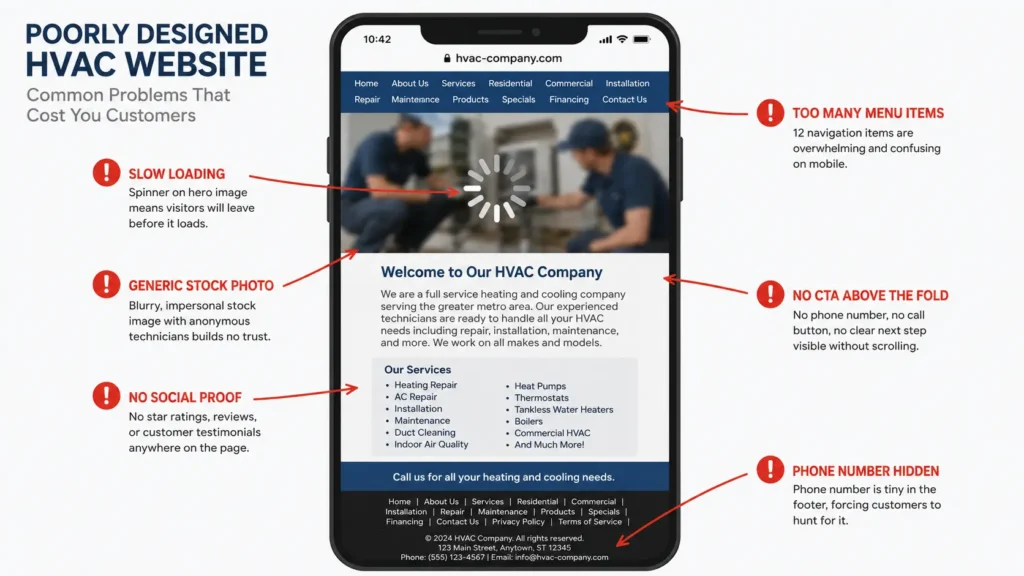
These aren’t hypothetical. They show up on the majority of HVAC contractor websites, including many built recently and for real money.
1. Stock photos instead of real team photos. The generic smiling technician holding a wrench has appeared on thousands of HVAC websites. Real photos of your actual team convert better, build more trust, and send stronger E-E-A-T signals to Google. A few hundred dollars in local photography pays for itself in a month.
2. Phone number buried in the footer or on the contact page only. If a visitor has to hunt for your number, they won’t. They’ll go to the next result. Your number belongs in the header, sticky, visible within one second on mobile — not on a separate page they have to navigate to.
3. One “Services” page for everything. This undermines your ability to rank for individual services. Google can’t rank a page for “AC repair” when that page also covers furnace installation, duct cleaning, and air quality testing. Separate service pages are non-negotiable for competitive local search.
4. No city-specific pages. “We serve the greater Phoenix metro area” is not a local SEO strategy. Twelve individual city pages for the twelve cities you actually serve is a strategy.
5. Mobile load time over three seconds. A single unoptimized hero image can add two to three seconds to your mobile load time. Run your site through Google PageSpeed Insights right now and check your mobile score. Anything below 70 is actively costing you rankings and leads during your busiest weeks.
6. Blog posts dated 2019 or 2020. A stale blog tells visitors — and Google — that your site isn’t being maintained. Update existing posts or add new ones. One fresh post per quarter outperforms six posts from four years ago.
7. Vague service area language with no specific cities named. “Serving the Greater [City] Area” doesn’t help you rank anywhere specific. Name the cities. Build pages for them.
8. No financing information on replacement service pages. If your AC installation page doesn’t mention financing, you’re losing customers who would say yes if they knew they could pay $149/month instead of $12,000 today. The objection gets raised before the call, and you’re not there to answer it.
9. No contractor license number on the site. Most states require licensed contractors to display their license number. Beyond compliance, customers look for it. If they can’t find it, some will assume you’re unlicensed — and move on.
10. No reviews visible on the homepage. If you have Google reviews — and you should — they should appear on your homepage. A five-star rating with “243 reviews” visible above the fold converts at a measurably higher rate than a homepage that makes visitors go looking for social proof themselves.
How to hire an HVAC web design agency: the right questions and red flags
Specialist HVAC agency vs. generalist web designer
A generalist web designer can produce a beautiful website. They may have no idea what a city page is, why separate service pages matter, or how your site architecture affects your Google Business Profile ranking. They’ll deliver a polished product that looks professional and generates few leads, because it was built without any understanding of how HVAC local search actually works.
A specialist HVAC or home services agency builds websites with local search as the starting point, not an afterthought. Keyword research happens before the first design decision. URL structure is planned before the first page is built. The city page strategy is scoped in the proposal.
The difference matters most in competitive markets. In a small town with two HVAC companies, a generalist-built site might rank fine. In a metro area with thirty contractors all running Google Ads and investing in SEO, the architectural decisions made during the build are the difference between page one and page three.
8 questions to ask before signing any HVAC web design contract
- Do I own the domain and all site files when the project is complete? Anything other than an unqualified yes is a reason to walk away.
- How many individual city pages are included in scope, and are they written with unique content for each city?
- Will my site share a template with other HVAC clients in your portfolio? Ask to see examples of their other HVAC work side by side before committing.
- What Core Web Vitals scores do your sites typically achieve on mobile? They should have a real answer ready, not a vague reassurance.
- Who writes the content — your team or me? Understand exactly what’s included and what you’re responsible for providing.
- What does ongoing maintenance include, and what’s the monthly cost?
- What’s your handoff process for SEO? Will I be able to update meta titles and add pages after launch?
- Do you have case studies from HVAC clients showing ranking or lead generation improvements? Ask for specific results, not testimonials.
Red flags that signal a bad HVAC web design agency
They guarantee first-page Google rankings. No one can guarantee this. It’s a sign they’ll say whatever it takes to close the deal.
The proposal doesn’t mention Core Web Vitals, page speed, or mobile performance. In 2026, any agency building for local search should treat performance as a core deliverable, not an optional add-on.
You don’t own the domain. Some agencies register your domain in their own account as a retention mechanism. Your business domain belongs to your business — full stop.
“SEO-friendly” without specifics. Every agency claims their sites are SEO-friendly. Ask what that means concretely: URL structure, schema markup, site speed benchmarks, keyword mapping. If they can’t answer with specifics, the phrase means nothing.
They can’t show you HVAC-specific case studies. An agency that has never built an HVAC site before isn’t necessarily wrong for the job — but they shouldn’t be charging HVAC-specialist rates.
Monthly fee with site ownership lock-in. If leaving the platform means losing the website you’ve been paying to build, the contract is structured around their retention, not your interests.
FAQs
How much does an HVAC website cost?
An HVAC website can cost anywhere from $300 per year for a DIY builder to $60,000 or more for a fully custom multi-location build. Most established contractors invest $5,000–$15,000 for a semi-custom agency build with proper local SEO architecture. Ongoing costs — hosting, maintenance, and content — typically run $150–$500 per month after launch.
What should an HVAC website include?
At minimum: a homepage with a visible phone number and clear service area, individual pages for each major service (AC repair, furnace installation, etc.), individual city pages for each area you serve, an About page with credentials and real team photos, a reviews page, a financing page, and a way to book or request a quote online. A blog section for informational content supports long-term SEO.
What is the best website builder for HVAC contractors?
For brand-new or solo contractors: Squarespace or Wix — fast, affordable, and professional. For growing businesses that want to compete in local search: WordPress, ideally built by an agency with HVAC experience. For large multi-location operators: a custom build or a platform integrated with your field service software (ServiceTitan, etc.).
How long does it take to build an HVAC website?
A DIY template site can be live in a weekend. A professional agency build typically takes 8–12 weeks from kickoff to launch for a semi-custom WordPress site. The most common delay isn’t the agency — it’s waiting on photography, service information, and review content from the contractor.
Do I need separate pages for each HVAC service?
Yes. Google ranks individual pages, not websites. Combining all your services on one page dilutes your ability to rank for any specific service keyword. Each major service — AC repair, furnace installation, heat pump service, duct cleaning — should have its own page with its own keyword target and conversion path.
How do I make my HVAC website rank on Google?
Local HVAC rankings are primarily driven by your Google Business Profile (complete and actively maintained), individual city pages with unique content for each service area, reviews (quantity and recency), and consistent NAP information across directories. Technical site quality — page speed, mobile performance, schema markup — amplifies those foundational signals once they’re in place.
How do I make my HVAC website rank on Google?
Local HVAC rankings are primarily driven by your Google Business Profile (complete and actively maintained), individual city pages with unique content for each service area, reviews (quantity and recency), and consistent NAP information across directories. Technical site quality — page speed, mobile performance, schema markup — amplifies those foundational signals once they’re in place.
Is it worth hiring an HVAC web design agency?
For contractors in competitive markets who are serious about organic lead generation, yes. A specialist agency builds with local search architecture from the start — something a generalist web designer or DIY template simply cannot replicate. The ROI question is straightforward: if your average job is worth $800–$2,000 and the site generates ten additional calls per month, a $10,000 investment pays for itself in weeks, not years.
Should I use WordPress or Squarespace for my HVAC website?
If you want to compete in local search in a market with established competitors, WordPress gives you the SEO control and flexibility that Squarespace can’t match at scale. If you’re a brand-new contractor who needs something live quickly and affordably, Squarespace gets you operational fast. For most growing contractors, the honest path is: start on Squarespace if you need to, migrate to WordPress when the revenue supports a proper build — and don’t wait longer than you have to.
How do I get more leads from my HVAC website?
Start with the fundamentals most sites get wrong: put your phone number in the sticky header, create individual pages for each service, build city pages for every area you serve, and compress your images so your mobile site loads in under three seconds. Then add Google reviews to your homepage, create a financing page, and make sure your site is correctly linked to your Google Business Profile. These changes — not a full redesign — account for most of the lead generation gap between average and high-performing HVAC websites.
Can a bad website hurt my HVAC business’s Google ranking?
Yes, directly. Core Web Vitals — Google’s performance metrics — are a confirmed ranking factor. A slow-loading site (LCP over 2.5 seconds on mobile) ranks below a faster competitor with equivalent content. Beyond performance, thin content, lack of individual city pages, and inconsistent NAP information across the web all actively suppress local rankings. A bad website doesn’t just fail to help — it creates ranking headwinds you’re fighting against every day.