
You built the city pages. Dallas. Plano. Frisco. Maybe a dozen more. You followed the advice one page per city, service name in the title, and keyword in the H1. Then you waited. The calls didn’t come from those pages. The rankings never showed.
Nothing went wrong. That’s the frustrating part. The pages are indexed, there are no errors in Search Console, and the strategy itself is sound. The execution is what’s off.
An HVAC service area page is a dedicated webpage targeting a city you serve without having a physical office there. Built right, it ranks for searches like “AC repair in Plano” and tells Google your business actively operates in that location. Built the way most contractors build them, swapping a city name into a copied template, it gets quietly filtered from results. No penalty notice. No warning. Just silence.
What follows is the specific framework that separates pages that rank from pages that don’t, including page structure, the content that makes each city page genuinely unique, URL architecture, schema markup, and how to decide how many pages your site actually needs.
Service Area Pages vs. Location Pages: Get This Wrong and Nothing Else Matters
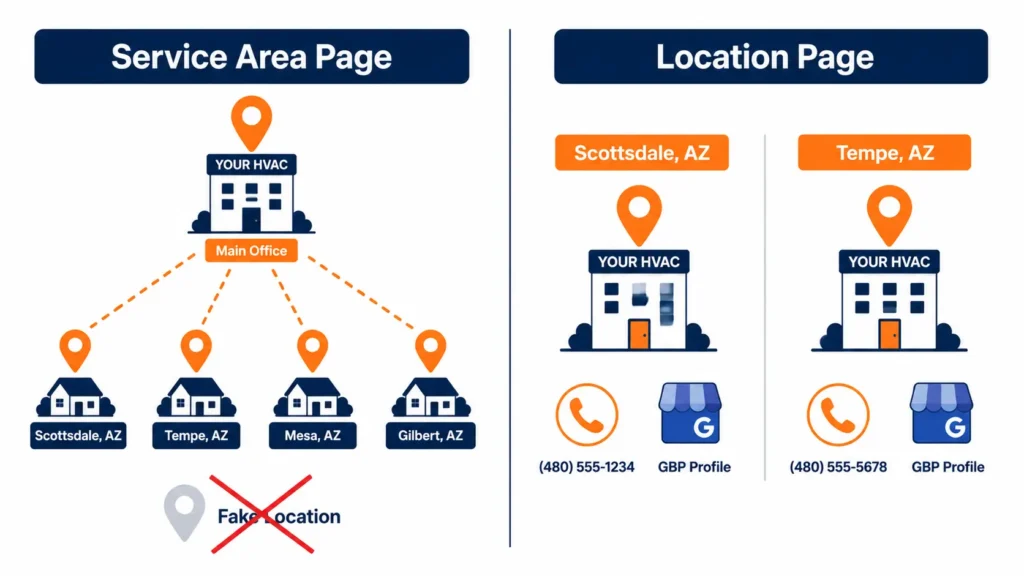
Most HVAC contractors build the wrong page type for their business model. The two options sound interchangeable. They’re not, and the mistake has real consequences.
A service area page targets a city you serve from a single home-base location. No separate address for that city. No dedicated Google Business Profile. No second phone number. This is what single-location contractors need for every city their trucks drive to.
A location page is for a city where you have an actual office, real staff on-site, a physical address, and its own verified GBP. If that sounds like your main office, it is. For every other city your technicians drive to, you want service area pages.
| Service Area Page | Location Page | |
|---|---|---|
| Physical office required? | No | Yes |
| Separate GBP needed? | No | Yes |
| Different phone number? | No | Yes |
| Who needs it? | Most HVAC contractors | Multi-office operations only |
The decision is straightforward: one location, technicians driving to 12 cities → 12 service area pages. Second office with its own staff and lease → location page for that city with its own GBP verification.
Building a fake location page without the address to back it up creates NAP conflicts across directories and an unverifiable GBP. That’s not a neutral outcome; it actively degrades the local signals you’re trying to build.
The Real Reason City Pages Don’t Rank
Google distinguishes between a page written about a city and a page written for people who live in one. The first type gets filtered. The second type ranks. Here’s what creates the difference:
The copy-paste build. A contractor builds a solid AC repair page, duplicates it 25 times, finds and replaces the city name, and publishes. Google doesn’t issue a penalty; it just doesn’t treat those pages as distinct. They get filtered as low-value duplicates. The outcome is indistinguishable from a penalty: the pages don’t appear for anything.
Thin content. “Thin content” means a page that exists on a topic but adds no useful information a searcher couldn’t find elsewhere, typically under 400 words with nothing location-specific. A city page that a homeowner in Frisco couldn’t find more useful than your homepage in 30 seconds is a thin page. Google’s quality systems are specifically designed to identify and suppress them.
Treating a list as a page. Some sites mention their cities in a sidebar widget or a paragraph below the fold: “We serve Dallas, Plano, Frisco, McKinney, and more.” That’s not a geo-signal; it’s a list. Google needs a dedicated URL to assign ranking authority for a specific location-based query.
Cannibalization from overlapping pages. If your site has both “AC Repair in Dallas” and “Dallas HVAC Services” pages that both target cooling repair, they compete with each other. Authority splits. Neither ranks as well as one consolidated, well-built page would.
No geographic proof. The page says “Dallas” but carries nothing that proves the business works there: no review from a Dallas homeowner, no reference to Dallas utility programs, nothing a company in a different state couldn’t also have written. Google reads these pages as geographically generic.
One clarification worth making explicit: Google doesn’t penalize pages for similar text across city pages. The filter triggers when pages are similar and thin. A page that shares 80% of its content with other city pages but adds 20% genuinely local information can rank. A page that’s 100% unique but says nothing useful won’t. Substance is the signal, not linguistic variety.
The Service Area Page Blueprint
Title Tag
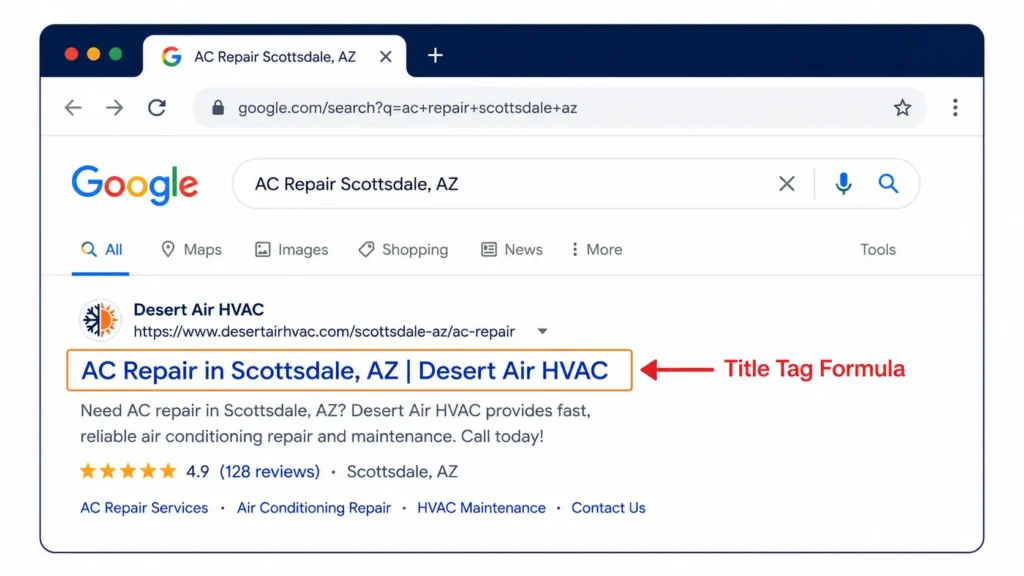
[Primary Service] in [City, State] | [Company Name]Real examples:
- AC Repair in Scottsdale, AZ | Desert Air HVAC
- Furnace Installation in Naperville, IL | Midwest Comfort Systems
- Emergency HVAC in Plano, TX | DFW Climate Control
One service per title. Stacking “AC Repair & Furnace Service & Heat Pump Installation in Scottsdale” dilutes the page’s topical signal and confuses intent matching. If you want to rank for multiple services in one city, build separate pages or identify which service has the highest search volume in that market and lead with it.
H1
Match the title tag intent exactly. “AC Repair in Scottsdale, AZ” is the H1. Don’t rewrite it to sound distinctive. The H1 confirms to Google and to the person who clicked that they’re on the right page. Creativity here works against you.
Opening Paragraph (60–80 Words)
Write this paragraph so someone reading only it knows the service, city, business, and why the combination matters. This is your featured snippet candidate. Don’t open with “Welcome to Desert Air HVAC, Scottsdale’s trusted local contractor. ” Open with what you do and where. Long-tail variations “air conditioning repair,” “cooling system service,” and “same-day AC diagnosis” work naturally into a paragraph this focused without needing to be forced.
Services Listed for This City
Not your full service menu, but the services that are actually relevant to this market. A page targeting a Phoenix suburb should lead with AC repair, AC replacement, duct cleaning, and emergency service. Furnace replacement is secondary in a climate that rarely drops below 40°F in winter. Trimming the list to what’s genuinely relevant tightens the page’s topical focus and reduces bounce from visitors who clicked for something you don’t lead with.
Trust Block
License number. Years operating in this area. Certifications: NATE, EPA 608, manufacturer authorizations. Not a paragraph about values or commitments, but a list of verifiable credentials. “Licensed in Arizona (ROC #XXXXXX). NATE-certified technicians. Carrier Factory Authorized Dealer since 2011. “One line each. Verifiable specificity is what separates pages that demonstrate expertise from pages that claim it.
The Local Signals Module
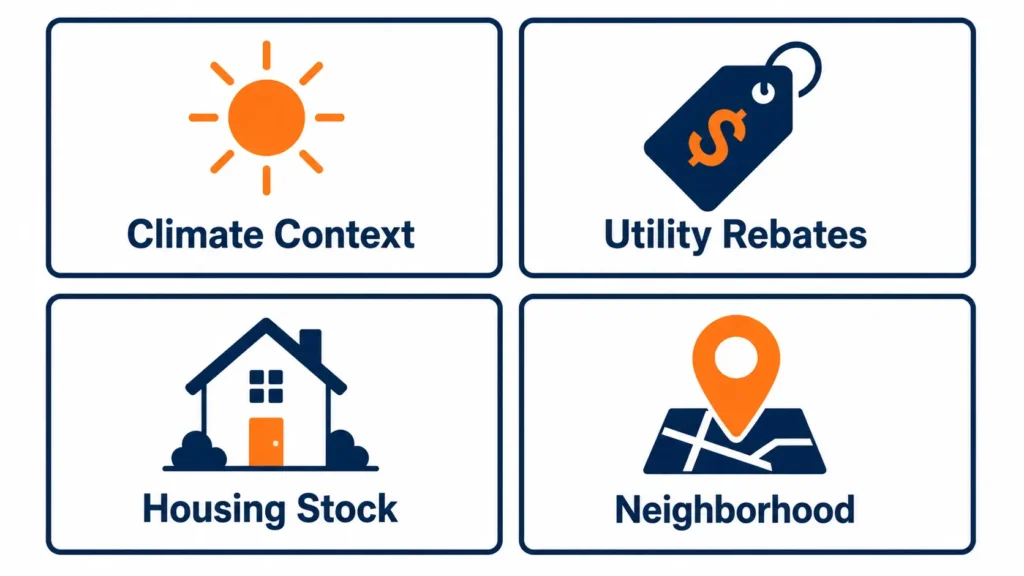
This is the section that earns the ranking. It’s also what most competitors skip entirely or do badly.
Four signals, written into two or three paragraphs, transform a generic service page into one that actually belongs in a specific city’s search results:
| Signal | Example in Practice |
|---|---|
| Climate context | “Scottsdale averages 299 sunny days a year. Residential AC systems here run six to eight months of heavy cycling; that’s why capacitors, contactors, and refrigerant levels need annual inspection rather than every-other-year service. |
| Utility rebates | “APS and SRP both offer rebates on qualifying ENERGY STAR equipment. On a qualifying Carrier or Trane installation, that can offset $300–$600 of the replacement cost. We handle the application at the time of install.” |
| Housing stock | “A significant share of North Scottsdale homes built between 1988 and 2002 still run R-22 refrigerant systems. R-22 hasn’t been manufactured in the US since 2020, so what’s available is reclaimed stock at premium prices. We evaluate whether a refrigerant retrofit or full system replacement makes more financial sense before recommending either.” |
| Neighborhood specificity | “We regularly run calls in DC Ranch, Grayhawk, McCormick Ranch, and Kierland with same-day availability across north and central Scottsdale for both emergency and scheduled service.” |
None of this requires research you don’t already have. Climate data is on Weather.gov. Utility rebate listings are on provider websites. Housing stock knowledge lives in your technicians’ heads; they see the same vintage systems in the same zip codes every week. Neighborhood names are in your dispatch log. The same local knowledge that powers these pages also drives your review strategy — homeowners who mention their neighborhood in a review are giving you the same geographic signal for free. For the complete system, see the HVAC review strategy guide..
One Local Customer Review
A single review from a homeowner in this specific service area, attributed by first name and neighborhood. Not pulled from your homepage aggregate. Not a generic rating. Something concrete: “James from McCormick Ranch, our carrier unit stopped cooling on a Saturday in August. Called at 8am, tech was there by 11, found a failed capacitor, had the part on the truck, and fixed it same visit.”
That review does three things at once: it’s unique content Google hasn’t seen on your other city pages, it’s social proof a neighbor will trust, and it anchors the page geographically in plain language that crawlers can parse.
City-Specific FAQ (2–3 Questions)
Not “What is an HVAC system?” questions a homeowner in this specific market would actually type. “What size AC unit does a 2,200 sq ft home in Scottsdale need?” “How often should I service my AC if it runs year-round?” “Is the APS rebate available for mini-split installations?” These questions reflect local climate, local housing stock, and local utility programs, and they capture long-tail search intent that the rest of the page doesn’t target.
CTA
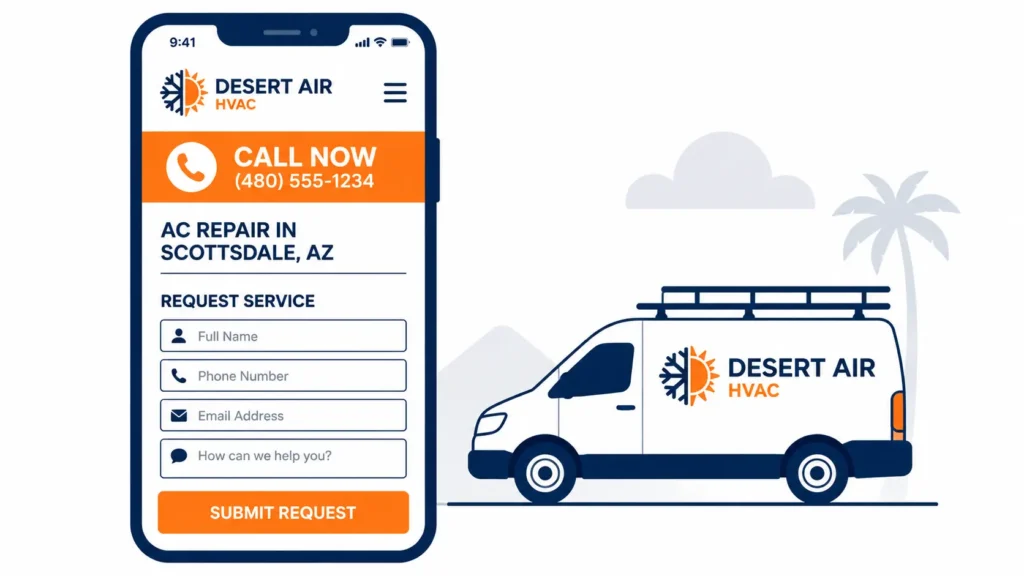
Click-to-call above the fold. Contact the form below it. In markets where emergency service drives a meaningful share of calls, the framing matters: “AC down in Scottsdale? We dispatch same-day. Call now and talk to a real technician, not a call center.” That’s not a brand voice exercise. It’s the language of someone who typed “AC repair Scottsdale” at 9am in July.
URL Structure for Multi-City Sites
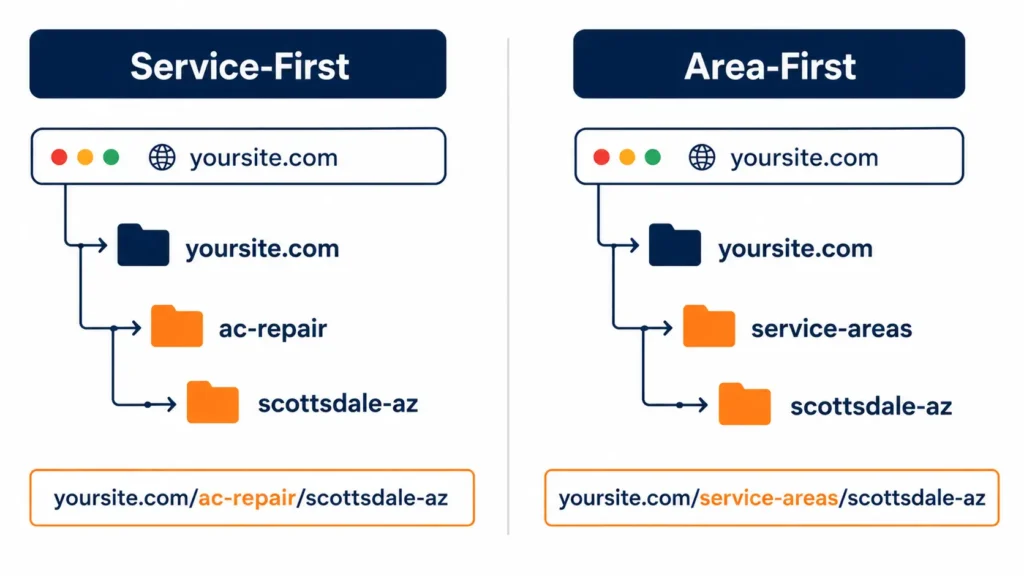
Two structures work. The choice depends on how your pages are built:
Service-first is best when each city page focuses on one primary service:
yoursite.com/ac-repair/scottsdale-az/
yoursite.com/furnace-repair/scottsdale-az/
Area-first best when one city page covers all your services for that location:
yoursite.com/service-areas/scottsdale-az/Service-first gives sharper keyword targeting per URL. Area-first is simpler to manage across a large number of cities. Both are correct, but mixing them on the same site creates structural inconsistency that Google has to interpret. Pick one pattern and hold it across every city you add.
Five things that matter for whether city pages get indexed and stay indexed:
- Submit every city page to your XML sitemap; don’t leave discovery to crawl alone
- Add breadcrumb navigation: Home → Service Areas → Scottsdale AC Repair
- Use canonical tags when two city pages carry very similar content, to indicate which is the preferred version
- Check that no city pages are accidentally blocked in robots.txt. Search Console’s The coverage report reveals this quickly
- Keep one URL per city per service; stacking multiple services onto one URL wastes the targeting specificity you built the page to deliver
How city pages connect to the rest of the site:
Each city page links to its corresponding service page (e.g., /ac-repair/scottsdale-az/ links to /ac-repair/). Each service page links back to its strongest-performing city pages. This two-way structure concentrates authority and gives Google a clear map of what you do and where you do it. Both the parent cluster HVAC local SEO and your core service pages should receive links from every city page you build. For how this fits into a full site architecture built to support local search, the HVAC website design guide covers that foundation directly.
How Many City Pages Should You Have?
The answer isn’t a number; it’s a rule: build one page per city where your trucks regularly run.
Every city page should have real dispatch history behind it. Not “we’d take a call there if one came in.” Cities you actively serve, have returning customers in, and can write four genuine local signals about are
| Business Scale | City Pages That Make Sense |
|---|---|
| Solo tech or new company | 3–5 high-volume cities |
| Small crew (2–5 techs) | 8–15 prioritized by search volume |
| Established contractor | 15–30 with full local content |
| Regional multi-crew | 30+ with a dedicated content process |
Before any city page goes live, three questions:
- Do your trucks run jobs in this city regularly, not occasionally?
- Does the page include the four local signals: climate context, utility rebate, housing stock, and neighborhood reference?
- Is there at least 500 words of content a homeowner in this city would find genuinely useful?
If the answer to any of these is no, hold the page. A city page that fails these checks won’t rank, and a site full of failing city pages suppresses the authority of the pages that should be ranking. Ten strong pages consistently outperform fifty weak ones in how Google’s quality assessment distributes ranking equity.
One thing most guides don’t mention: city pages need to be refreshed. If a utility rebate program ends, a new one launches, or housing stock in an area shifts toward newer systems (heat pumps, zoned systems, higher SEER requirements), an outdated city page stops reflecting what searchers there actually need. Build a review cycle into your process; check each city page against current local conditions at least once a year. A page that was strong 18 months ago can quietly become thin as local context changes around it.
Frequently Asked Questions
What is an HVAC service area page?
An HVAC service area page is a dedicated webpage targeting a specific city or suburb you serve, without requiring a physical office there. It ranks for searches like “furnace repair in [city]” by giving Google a specific, location-tied URL rather than a homepage that lists multiple cities in passing. Unlike a location page, it doesn’t require a separate address or Google Business Profile.
Do HVAC service area pages actually work for local SEO?
Yes, when built with genuine local content. A homepage cannot rank for a dozen different city-plus-service combinations. Dedicated city pages each target one geo-intent query, which is how HVAC contractors expand their organic footprint across a full-service territory. The pages that don’t work are the ones built on copied templates with the city name as the only variable.
How do I avoid duplicate content problems across city pages?
Reframe it as a thinness problem, not a duplication problem. Shared service descriptions across city pages don’t cause ranking issues on their own. Shared service descriptions with nothing added, no local context, no city-specific review, and no unique signals do. The working approach: write one strong service foundation, then add 20% unique local content to each city page. That combination is enough for Google to treat each page as distinct.
What’s the practical difference between a service area page and a location page?
A service area page says: “We serve this city.” A location page says: “We have an office in this city.” Location pages require a real physical address, a verified GBP, and ideally a local phone number. Without all three, what you’ve built is a service area page mislabeled as a location page, and that mislabeling creates citation conflicts across directories that take months to untangle.
How long should a city page be?
Five hundred to eight hundred words of specific content will outperform 1,500 words of generic copy consistently. Length isn’t the ranking signal substance. A 600-word page with a climate stat, a utility rebate note, a housing stock observation, one local review, and a focused FAQ has more ranking potential than a 1,200-word page of standard contractor boilerplate with the city name in the title.
Should I have separate pages for AC repair and furnace repair in every city?
For your highest-volume cities, yes. “AC Repair in Austin” and “Furnace Repair in Austin” target different search queries and should be separate pages once you have the local content to make each one substantive. For lower-priority markets, one consolidated service area page per city is better than two thin single-service pages. Build depth first, then expand into separate service-city pages as traffic justifies it.
Where to Start
Pull up your dispatch history and find the five cities where you run the most jobs. Open each existing city page and ask one question: does this page say anything a contractor 400 miles away couldn’t have written? If it’s a title tag and 300 words of generic copy with the city name inserted, that’s the starting point.
Rebuild those five pages using the blueprint above. Add the schema markup with areaServed it. Submit the updated URLs to Search Console and request indexing. In 60–90 days, check which pages are appearing for city-level queries in the performance report.
Once those pages are generating impressions and clicks, apply the same process to your next tier, the cities you serve regularly but haven’t built proper pages for yet. The framework scales. The content work doesn’t get easier, but it gets faster once the pattern is set.
The contractor who ranks in Scottsdale isn’t the one who listed Scottsdale on their homepage. It’s the one who wrote about Scottsdale’s summers, its 1990s housing stock, its utility rebate programs, and its neighborhoods and built a page a Scottsdale homeowner would actually find useful. That’s the entire gap this framework is built to close.
For the broader local SEO system these pages feed into, including HVAC digital marketing strategy, Google Business Profile setup, citation consistency, and review generation, the complete playbook is in our HVAC Local SEO guide. If the site structure underneath these pages needs work first, the HVAC website design guide covers that foundation.